Due to European Union’s Digital Markets Act (DMA)1, users in European Economic Area (EEA)2 are able to uninstall the notorious Microsoft Edge in their Windows Devices3. If you are not in EEA, this tutorial may help you configure your Windows in EEA and uninstall MS Edge.
(I) Disable UCPD 4
UserChoice Protection Driver (UCPD) is a system driver that preventing executables from changing http, https and .pdf file associations, it also prevent us from editing registry5. So we need to disable it.
1. Check UCPD status
Execute the following command in CMD(Admin) to show UCPD running status:
sc query ucpdIf you see STATE : 4 RUNNING, then UCPD is running.
For example:
C:\>sc query ucpd

SERVICE_NAME: ucpd
        TYPE               : 2  FILE_SYSTEM_DRIVER
=====>  STATE              : 4  RUNNING   <=====
                                (STOPPABLE, NOT_PAUSABLE, IGNORES_SHUTDOWN)
        WIN32_EXIT_CODE    : 0  (0x0)
        SERVICE_EXIT_CODE  : 0  (0x0)
        CHECKPOINT         : 0x0
        WAIT_HINT          : 0x0
Execute the following command in CMD(Admin) to show service running status:
sc qc ucpdIf you see START_TYPE : 1 SYSTEM_START, then UCPD is triggered at login.
For example:
C:\>sc qc ucpd
[SC] QueryServiceConfig SUCCESS

SERVICE_NAME: ucpd
        TYPE               : 2  FILE_SYSTEM_DRIVER
  ====> START_TYPE         : 1   SYSTEM_START   <====
        ERROR_CONTROL      : 1   NORMAL
        BINARY_PATH_NAME   : system32\drivers\UCPD.sys
        LOAD_ORDER_GROUP   : FSFilter Activity Monitor
        TAG                : 0
        DISPLAY_NAME       : UCPD
        DEPENDENCIES       :
        SERVICE_START_NAME :
Don't close the CMD window, we will need it later!
2. Disable UCPD and its service
a. Disable UCPD TaskPlaner job
Microsoft has stored a TaskPlaner job to reactivate UCPD when it is disabled, so before disabling UCPD itself, we need to disable the TaskPlaner job first.
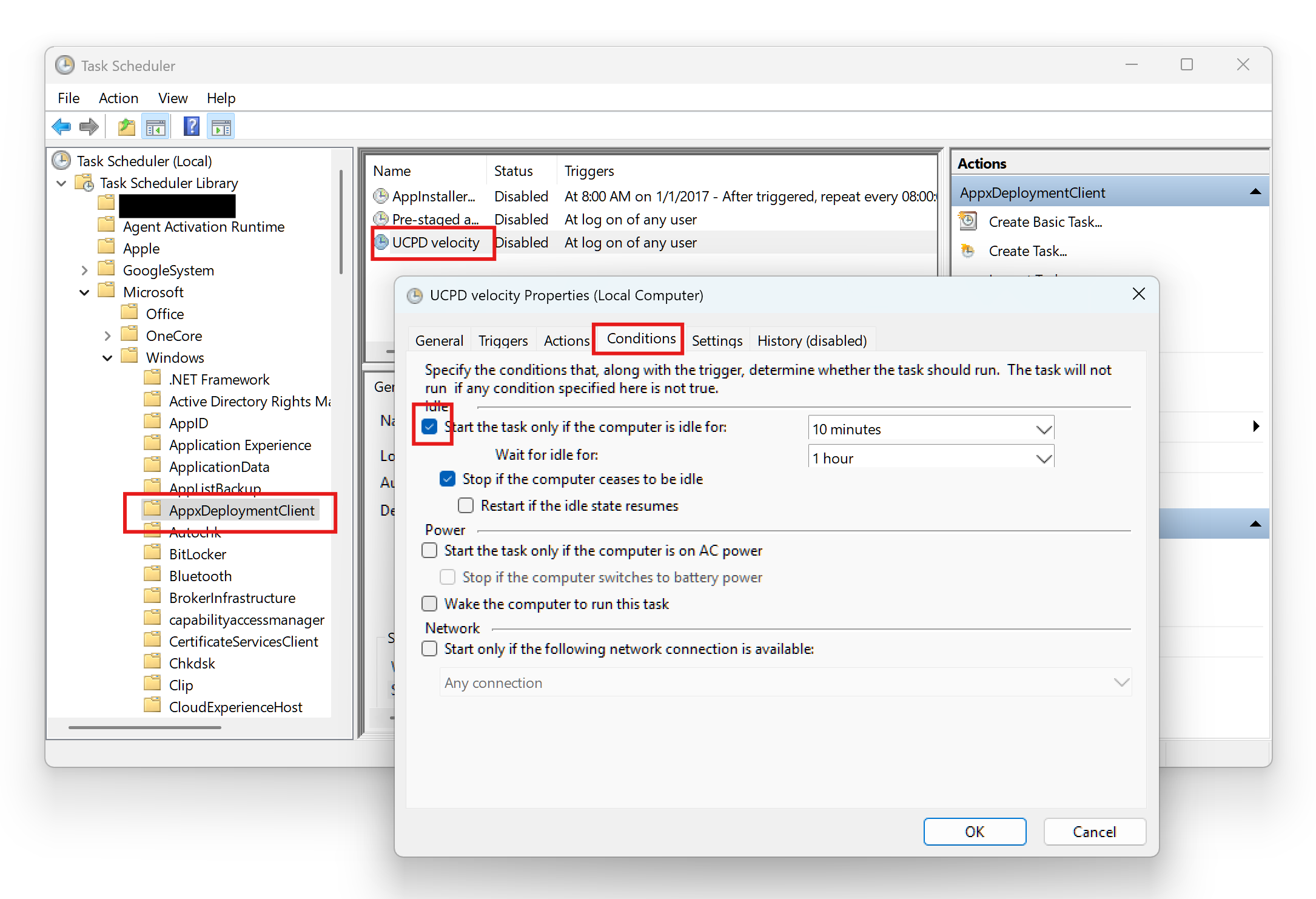
Search Task Scheduler and navigate to \Microsoft\Windows\AppxDeploymentClient, you will see the Status of UCPD velocity is Ready.
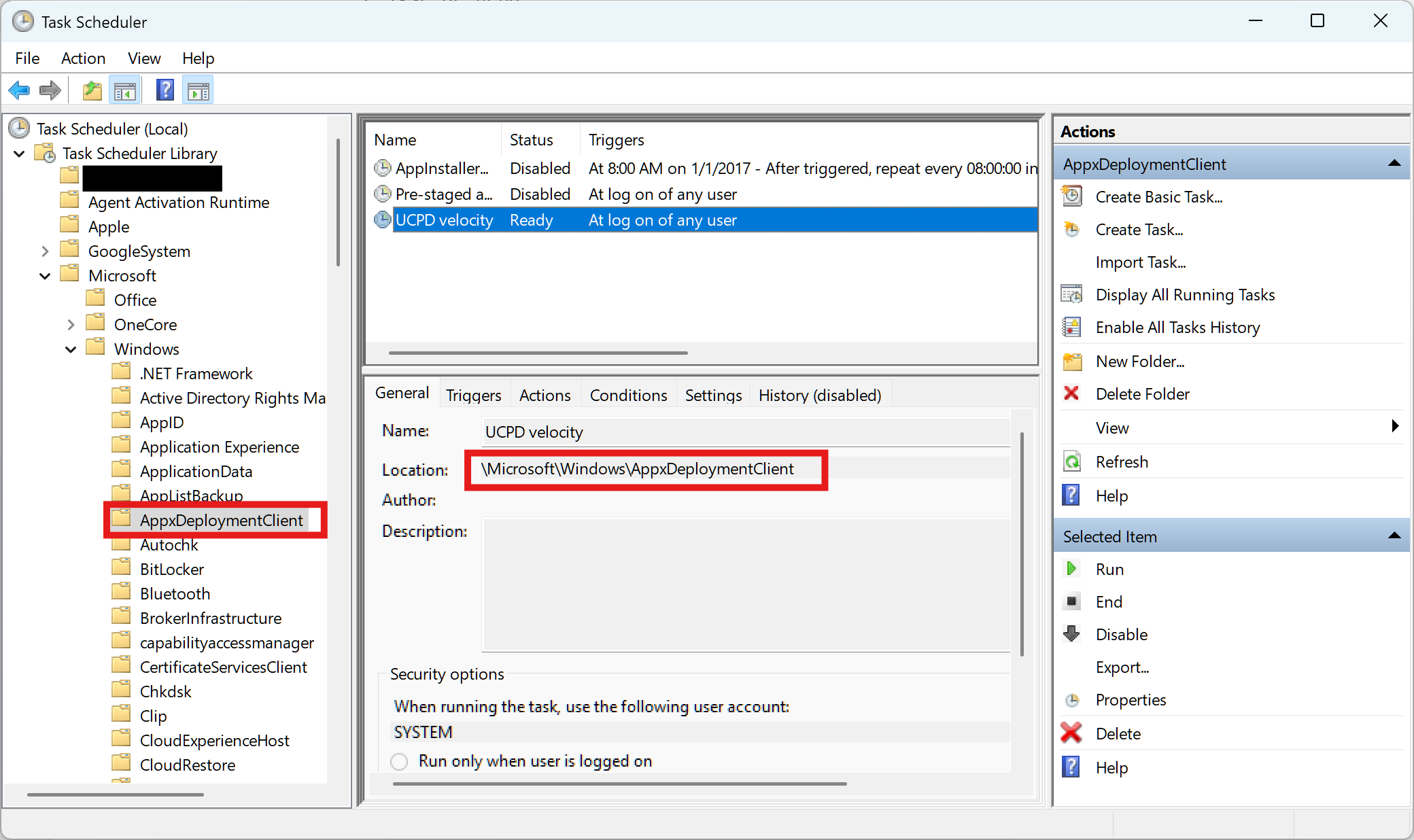 sensitive info is masked
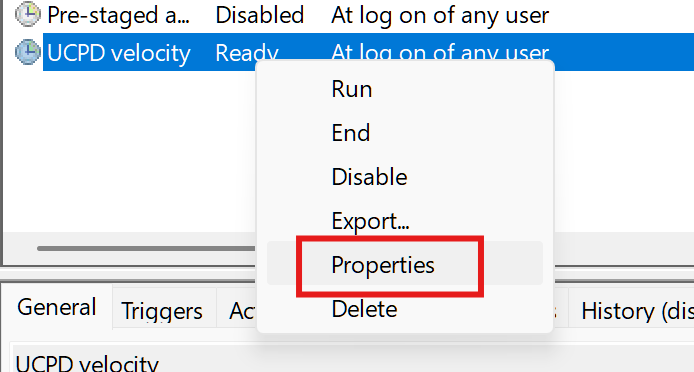
Right click it and select
sensitive info is masked
Right click it and select Properties.
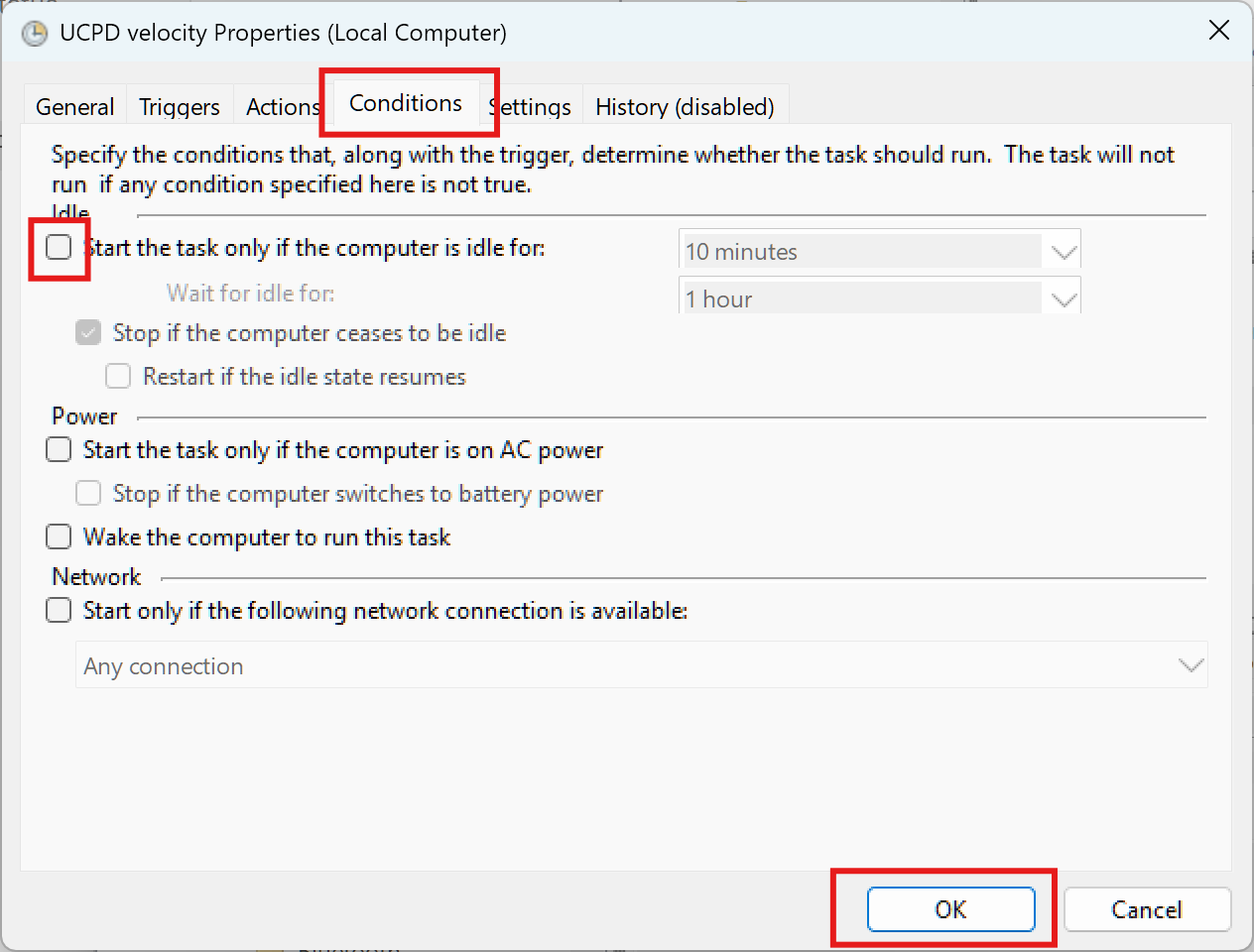
 In properties section, click
 Conditions, uncheck Start the task only if the computer is idle for: and click OK.
 Right click again and Disable it.
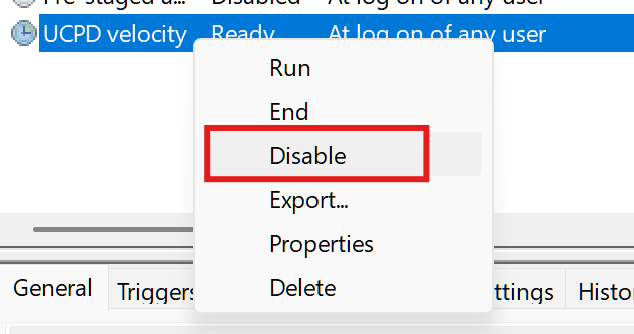 Now We’ve disabled the TaskPlaner job, let’s disable UCPD now.
b. Disable UCPD
Execute the following command in CMD(Admin) to disable UCPD:
sc config UCPD start= disabledIt shows:
C:\>sc config UCPD start= disabled
[SC] ChangeServiceConfig SUCCESS
Now we can check UCPD status to confirm it is indeed disabled.
sc qc ucpdC:\>sc qc ucpd
[SC] QueryServiceConfig SUCCESS
SERVICE_NAME: ucpd
TYPE : 2 FILE_SYSTEM_DRIVER
====> START_TYPE : 4 DISABLED <========
ERROR_CONTROL : 1 NORMAL
BINARY_PATH_NAME : system32\drivers\UCPD.sys
LOAD_ORDER_GROUP : FSFilter Activity Monitor
TAG : 0
DISPLAY_NAME : UCPD
DEPENDENCIES :
SERVICE_START_NAME :Execute sc query ucpd and it turns out, ucpd is still running, the next step is reboot your machine.
ucpdcan not be stoppedIf you tried stop the service using
sc stop ucpd, you will get a failure response that[SC] ControlService FAILED 1052: The requested control is not valid for this service.So we have to restart Windows.
After rebooting, ucpd is STOPPED.
C:\>sc query ucpd

SERVICE_NAME: ucpd
        TYPE               : 2  FILE_SYSTEM_DRIVER
        STATE              : 1  STOPPED
        WIN32_EXIT_CODE    : 1077  (0x435)
        SERVICE_EXIT_CODE  : 0  (0x0)
        CHECKPOINT         : 0x0
        WAIT_HINT          : 0x0
(II) Change to a EEA country
1. Choose a country
Select a EEA country in 2 and search the two char country code in ISO 3166-1 alpha-2 - Wikipedia and find its “Geographical location identifier”(GEOID) in Table of Geographical Locations - Win32 apps | Microsoft Learn.
For example:
| Country | two char code | GEOID(Hex) | GEOID(decimal) |
|---|---|---|---|
| Ireland | IE | 0x44 | 68 |
Ireland is the only country in EEA use English as its official language.
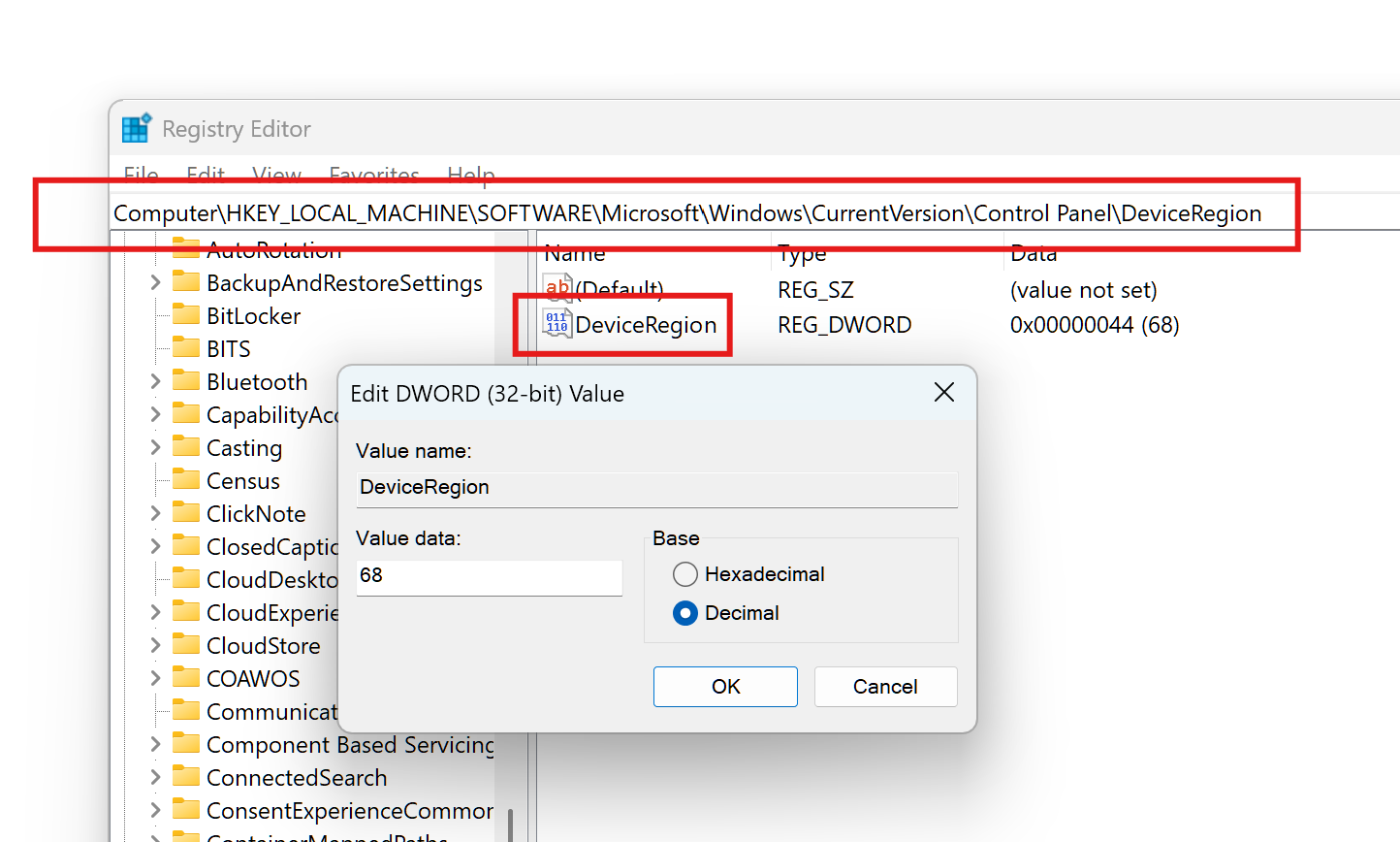
2. Edit Registry 7
Edit HKEY_LOCAL_MACHINE\SOFTWARE\Microsoft\Windows\CurrentVersion\Control Panel\DeviceRegion\DeviceRegion to your selected GEOID.
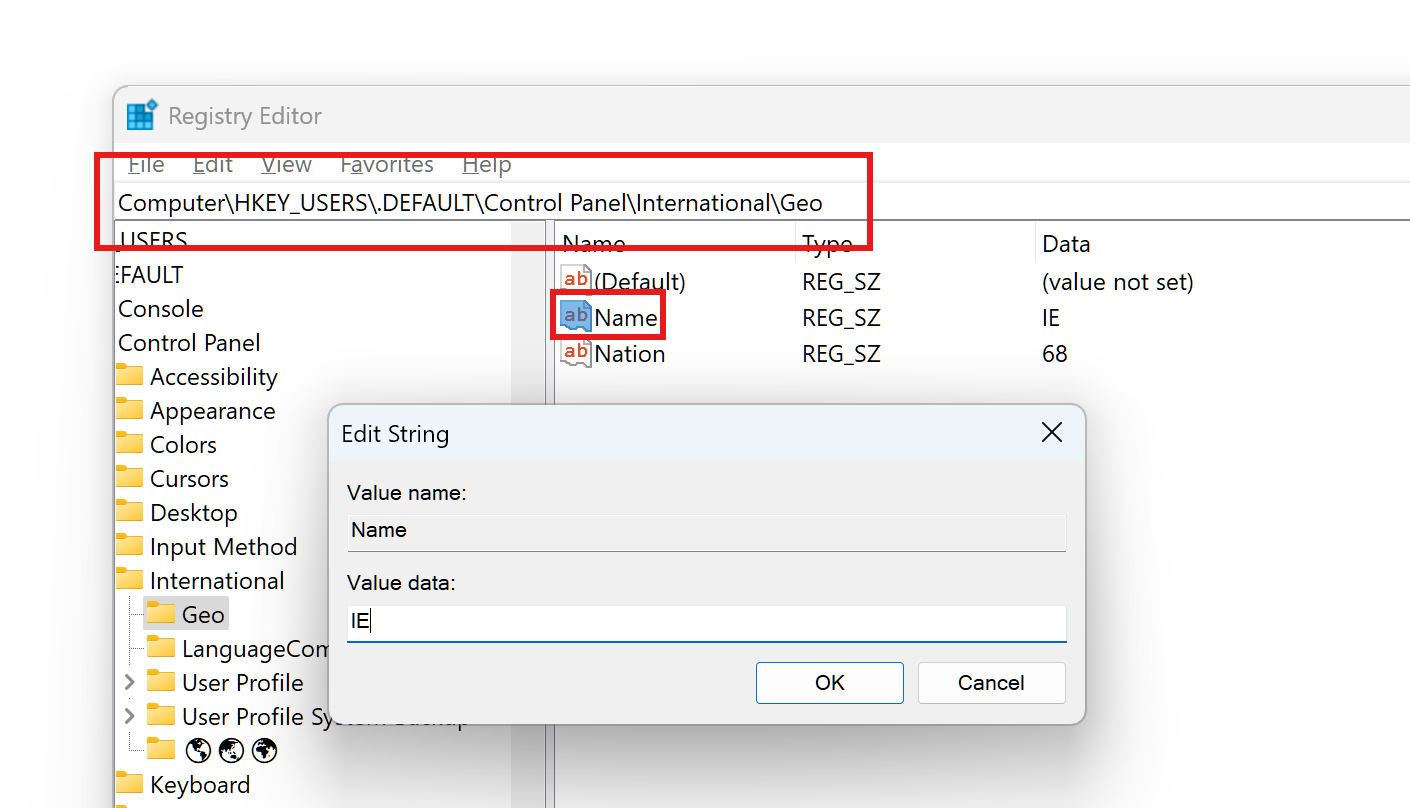
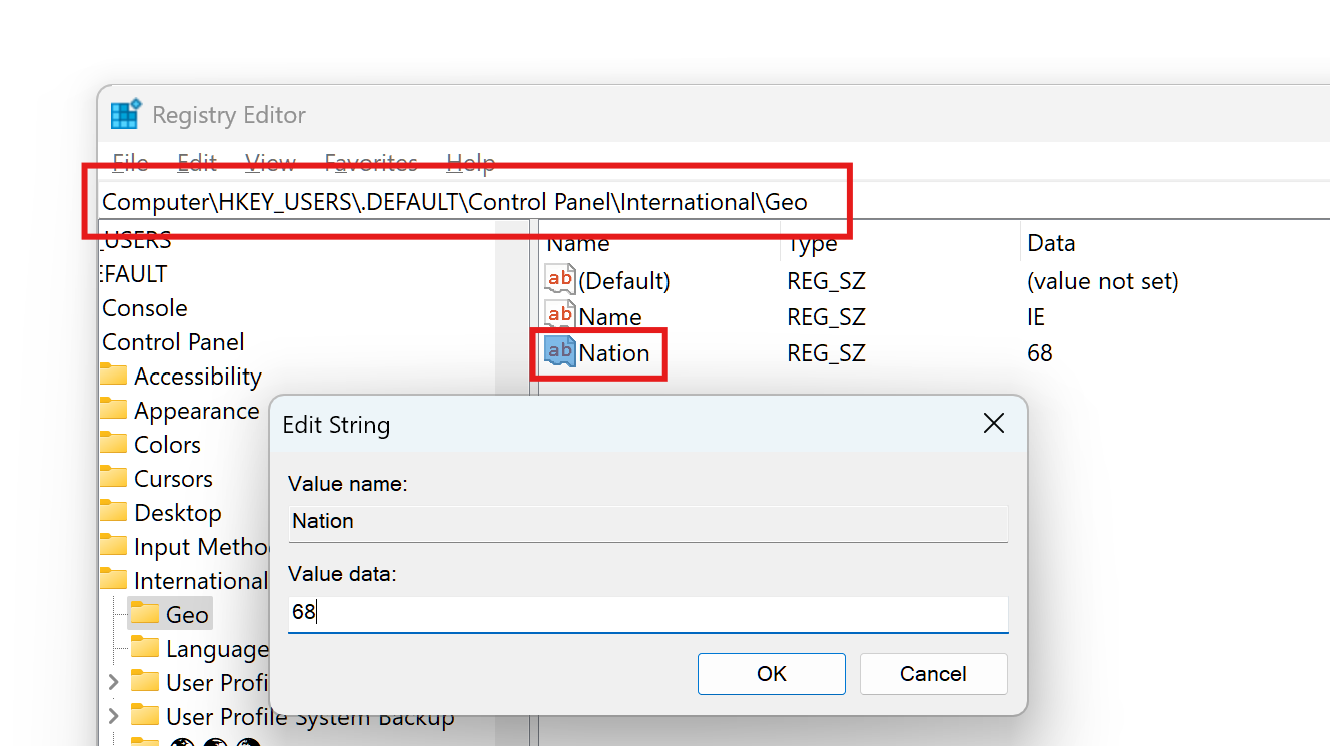
Edit HKEY_USERS\.DEFAULT\Control Panel\International\Geo\Name to your selected two char code and edit HKEY_USERS\.DEFAULT\Control Panel\International\Geo\Nation to GEOID.
 Same for
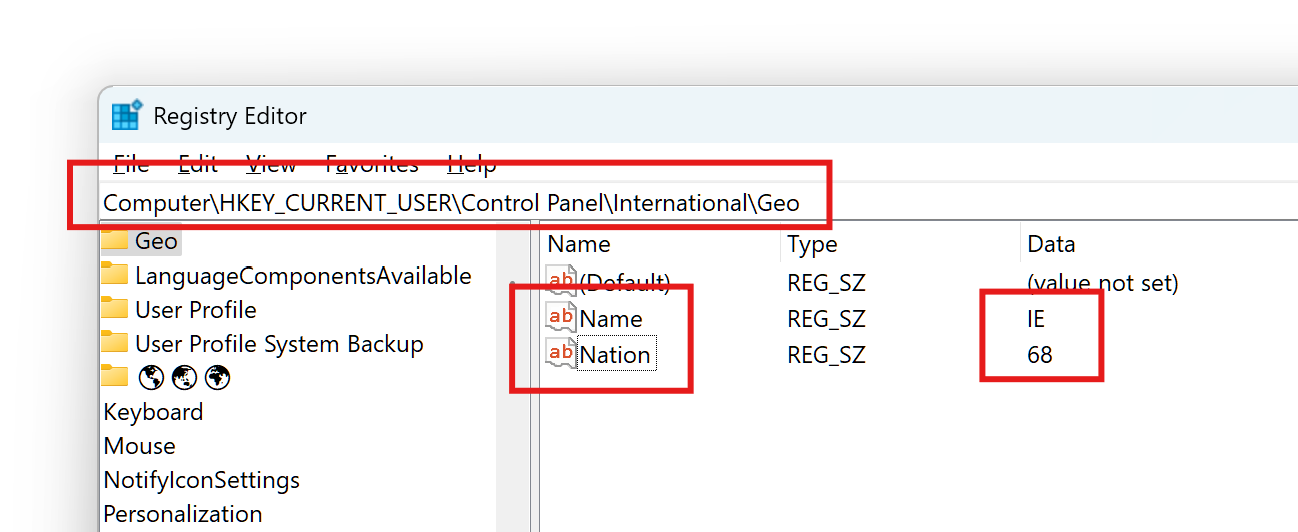
 HKEY_CURRENT_USER\Control Panel\International\Geo\Name and HKEY_CURRENT_USER\Control Panel\International\Geo\Nation.
3. Change Country or Region in Settings
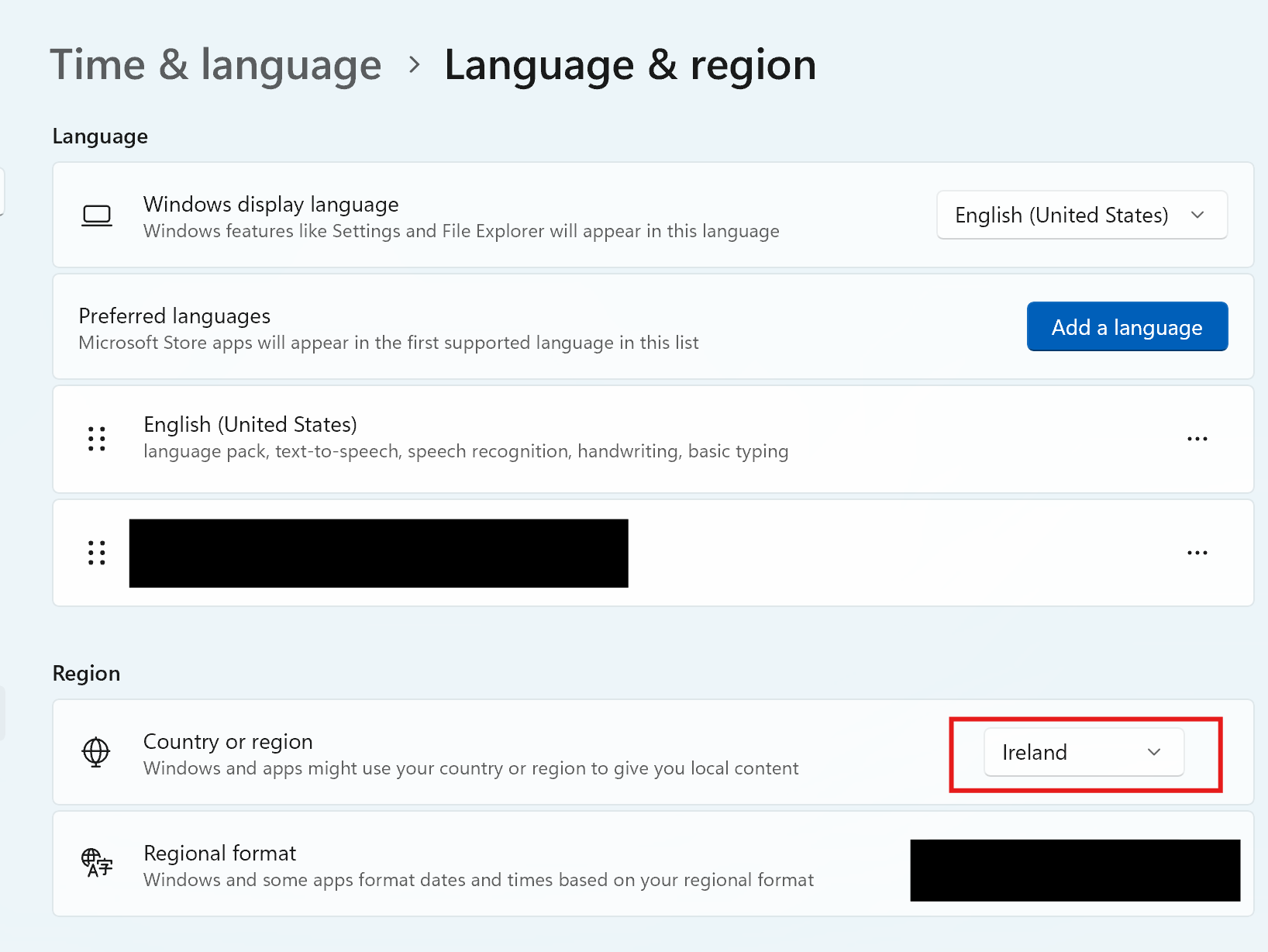
In Windows Settings, Time & Language > Language & Region, Change Country or region to your selected country.
 sensitive info is masked
Then reboot.
I don't know if it will be reverted by Windows Update.
(III) Check if effects are taken or not
There are a few ways to check whether we switched the region to EEA.
1. Use MSEdgeRedirect
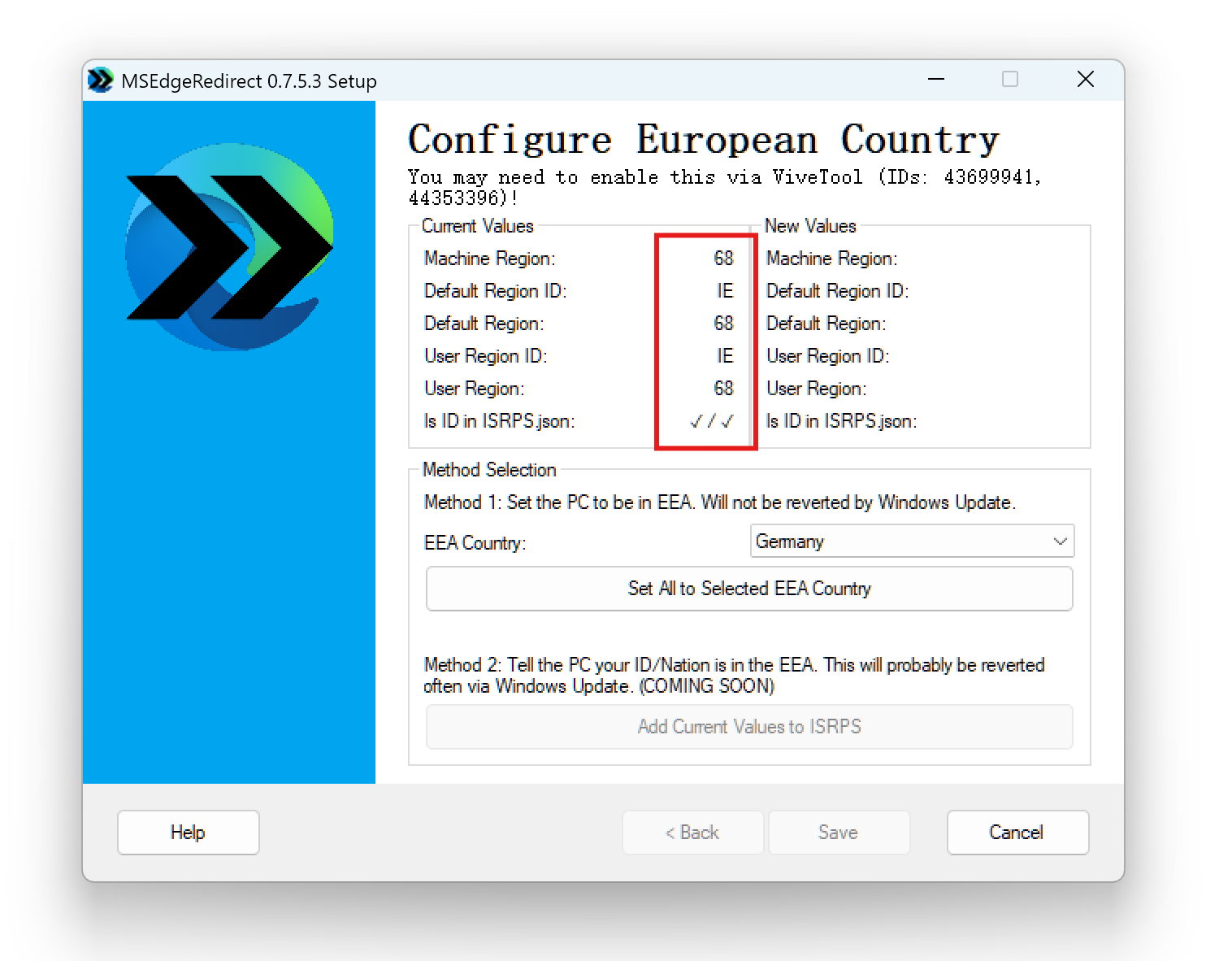
If anything goes well, your device’s Machine Region, Default Region, User Region are all the region you selected, you can check this out with MSEdgeRedirect.
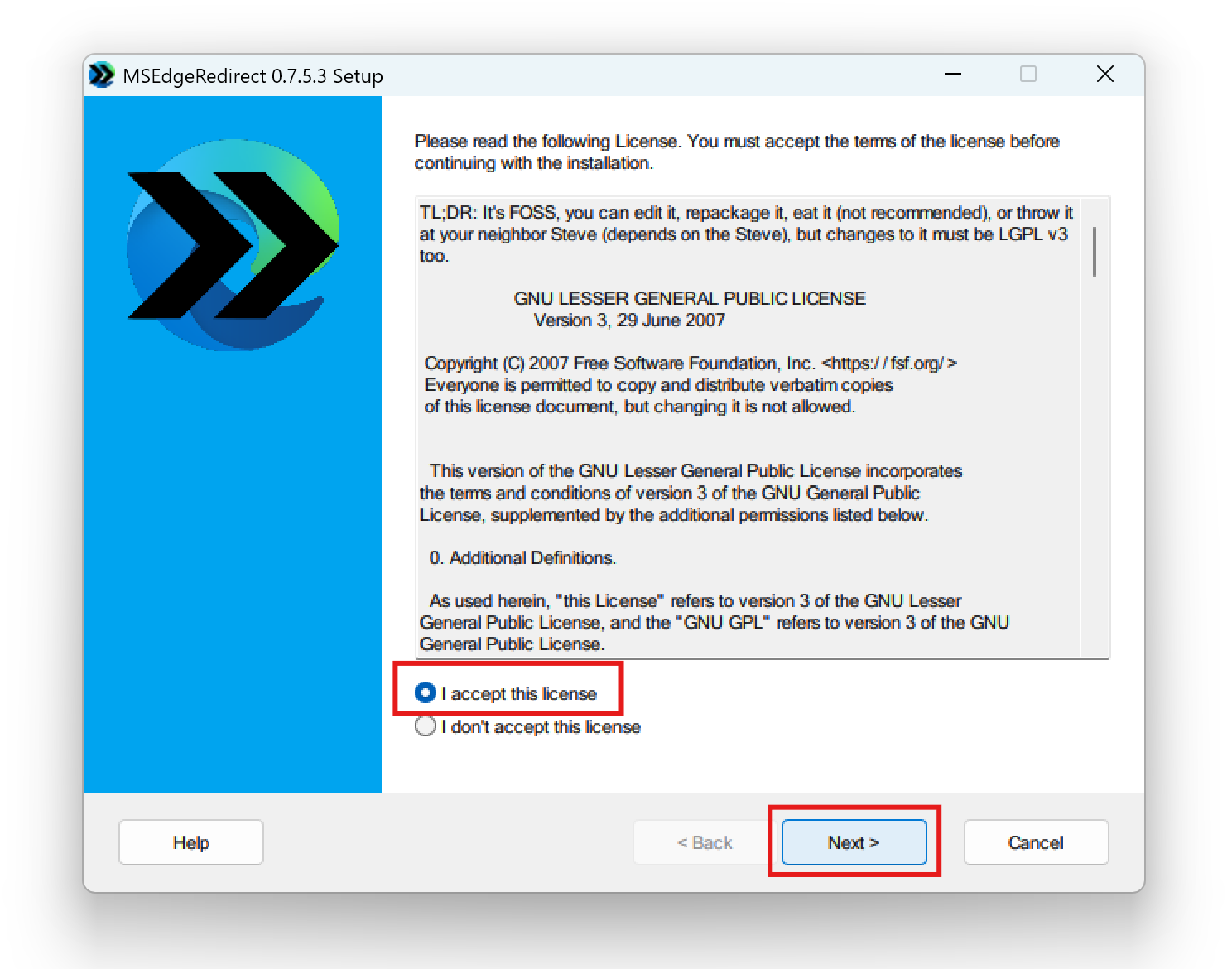
Download MSEdgeRedirect from GitHub, run MSEdgeRedirect.exe, read and accept the license.
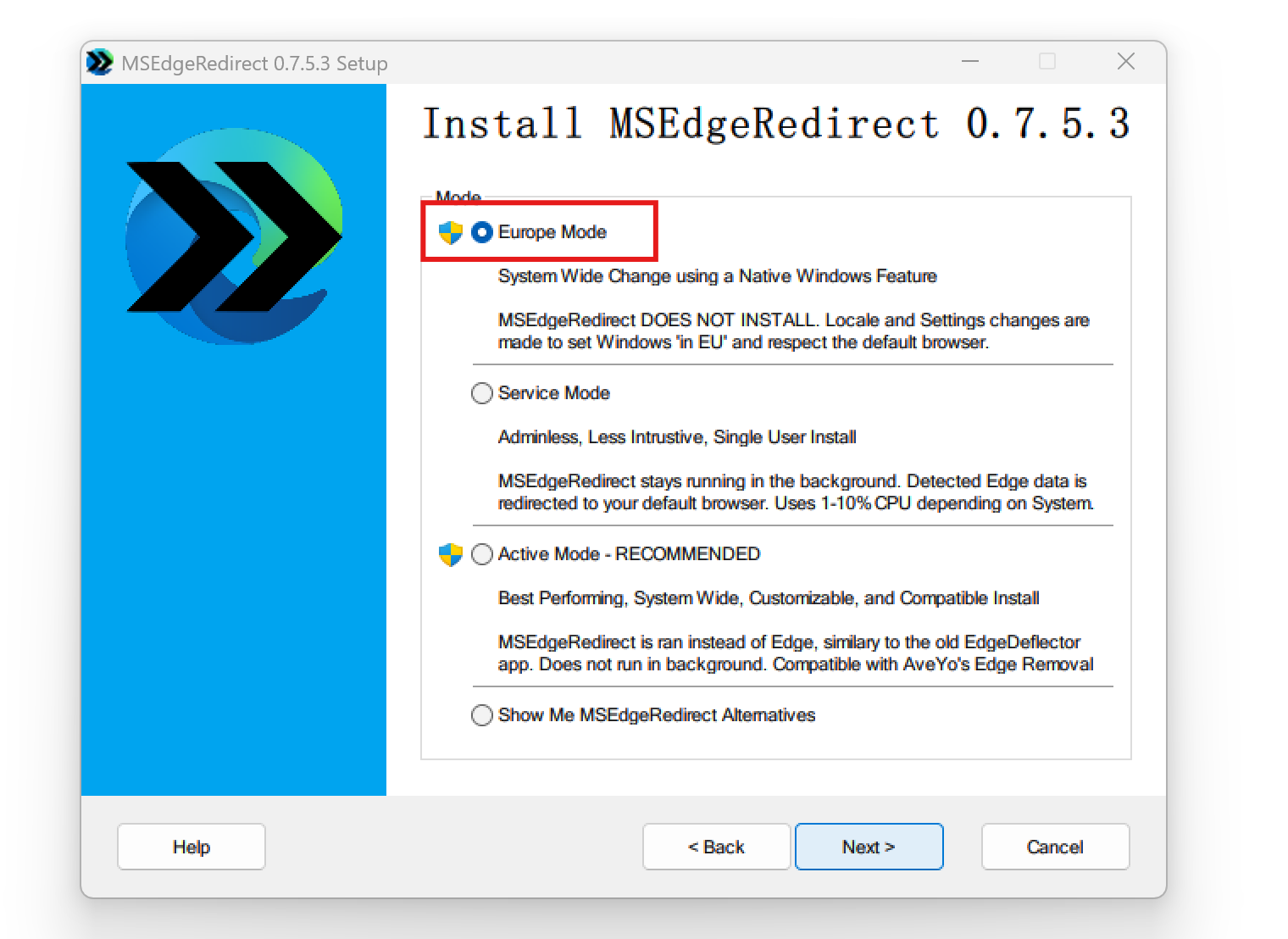
Select Europe Mode, a UAC window will be shown, click yes.
If User Region and Default Region are different and you are sure you didn’t miss any step, don’t be upset, try to reboot multiple times, they will be same magically.
2. MS Edge account will be logout
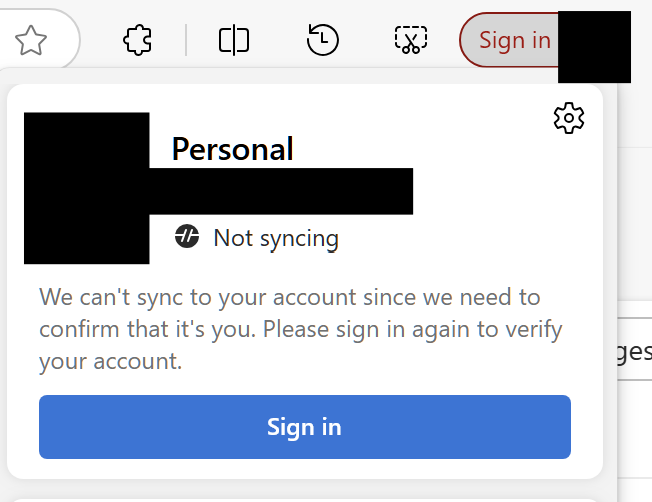
Once you set your region to EEA, your MS Edge account will be logout and it prompts you to sign in again.
 sensitive info is masked
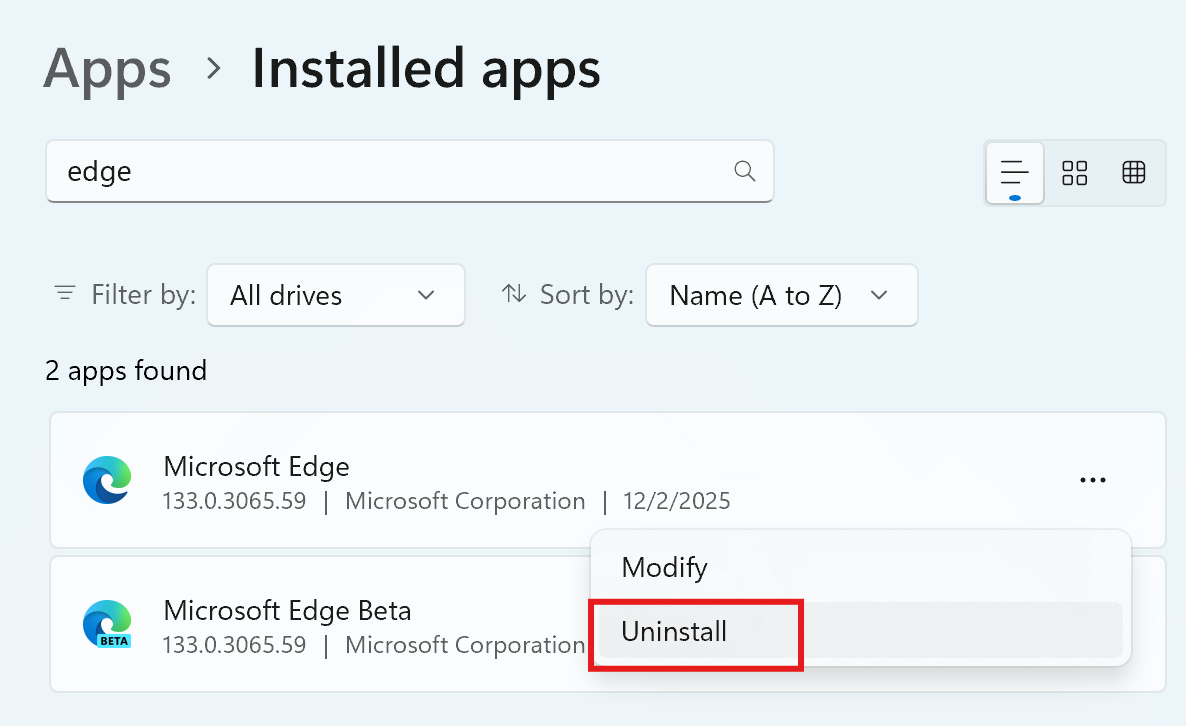
3. Try to uninstall MS Edge
You are able to uninstall MS Edge(that’s what we want!).
(IV) Change UCPD Back
Now we’ve successfully tricked Windows as if we are physically in EEA countries, the last step is change the UCPD settings back(you don’t want your default apps being hijacked like MS Edge and some sensitive registry values being edited by some malwares, don’t you?). What we need to do is doing (I) reversely.
Enable UCPD TaskPlaner job.
 sensitive info is masked
Execute the following command in CMD(Admin) to enable UCPD:
sc config UCPD start= systemIt shows:
C:\>sc config UCPD start=system
[SC] ChangeServiceConfig SUCCESS
And we check this using sc qc ucpd
C:\>sc qc ucpd
[SC] QueryServiceConfig SUCCESS

SERVICE_NAME: ucpd
        TYPE               : 2  FILE_SYSTEM_DRIVER
        START_TYPE         : 1   SYSTEM_START
        ERROR_CONTROL      : 1   NORMAL
        BINARY_PATH_NAME   : system32\drivers\UCPD.sys
        LOAD_ORDER_GROUP   : FSFilter Activity Monitor
        TAG                : 0
        DISPLAY_NAME       : UCPD
        DEPENDENCIES       :
        SERVICE_START_NAME :
Now UCPD is stopped if we check it using sc query ucpd.
C:\>sc query ucpd

SERVICE_NAME: ucpd
        TYPE               : 2  FILE_SYSTEM_DRIVER
        STATE              : 1  STOPPED
        WIN32_EXIT_CODE    : 1077  (0x435)
        SERVICE_EXIT_CODE  : 0  (0x0)
        CHECKPOINT         : 0x0
        WAIT_HINT          : 0x0
We only need to start it using:
sc start ucpdNow ucpd is back.
C:\>sc start ucpd

SERVICE_NAME: ucpd
        TYPE               : 2  FILE_SYSTEM_DRIVER
        STATE              : 4  RUNNING
                                (STOPPABLE, NOT_PAUSABLE, IGNORES_SHUTDOWN)
        WIN32_EXIT_CODE    : 0  (0x0)
        SERVICE_EXIT_CODE  : 0  (0x0)
        CHECKPOINT         : 0x0
        WAIT_HINT          : 0x0
        PID                : 0
        FLAGS              :
reboot seems work as well but I haven’t tried it.
Links may useful
Last but not least, there are a few links you may refer to, which may give a helping hand.
UCPD blocking Europe Mode · Issue #404 · rcmaehl/MSEdgeRedirect
Revert the Europe EEA Machine Region · Issue #392 · rcmaehl/MSEdgeRedirect
If you want to explore more about UCPD itself, you can go to 4 or simply go to C:\Windows\System32\IntegratedServicesRegionPolicySet.json to see other region lock features.
Footnotes
-
EU, EEA, EFTA and Schengen Area countries | European Union | Government.nl ↩ ↩2
-
Microsoft implements DMA compliance measures - EU Policy Blog ↩
-
(German) Windows UserChoice Protection Driver UCPD / UCPD.sys / UCPDMgr.exe – Gunnar Haslinger ↩ ↩2
-
UserChoice Protection Driver – UCPD.sys – the kolbicz blog ↩
-
List of countries and territories where English is an official language - Wikipedia ↩
-
Last update breaks Explorer and Settings in Windows 10 (+ Europe Mode does not work as intended) · Issue #367 · rcmaehl/MSEdgeRedirect ↩